What is an Azure landing zone?
An Azure landing zone is Microsoft’s answer to a question every organization runs into once they have more than a handful of subscriptions: how do you govern, secure, and scale Azure at that point without every team reinventing the same networking, identity, and policy decisions independently?
Per Microsoft’s own definition, a landing zone is built from two components:
- Platform landing zone — the centralized foundation. Management group hierarchy, shared connectivity, identity, security monitoring, and management resources. Most organizations should have exactly one of these per Entra tenant.
- Application (workload) landing zones — where individual teams actually deploy their workloads, operating inside the guardrails the platform landing zone established, without needing to re-solve governance themselves.
Both can be implemented two ways: Microsoft-provided accelerators (infrastructure as code
following documented recommended practices), or a custom build. Accelerators are the faster
path for most organizations, and it’s the one this post covers — specifically the official
alz-terraform-accelerator.
Why the management group hierarchy matters
The management group hierarchy is the actual governance mechanism, not just an organizational nicety. Azure Policy assignments attach to management groups and inherit down through every subscription underneath — get the hierarchy right, and policy enforcement is consistent by construction. Get it wrong, and you’re reconciling drift by hand.
The hierarchy separates platform resources from workload resources, and workload subscriptions land in one of three places depending on their connectivity requirements: Corp (needs private connectivity back to on-prem/hub), Online (internet-facing, no private connectivity needed), or Local (isolated, workload-specific networking).
Hub-and-spoke vs. Virtual WAN
Microsoft’s reference architectures cover two networking topologies for the connectivity subscription: traditional hub-and-spoke (a hub VNet peered to spoke VNets) and Azure Virtual WAN (a managed backbone with virtual hubs, better suited to many regions or complex routing). Neither is universally “correct” — the accelerator supports both, toggled by which variables you populate.
Implementing it: the alz-terraform-accelerator
The official accelerator isn’t a single monolithic template — it’s a set of starter modules built on Azure Verified Modules (AVM), wired together through one templating layer so the rest of the config never touches raw variables directly.
Layout
The accelerator’s own files handle the platform landing zone itself, unmodified; everything below is what this deployment adds on top, to customize the hierarchy and add the Landing Zone A2 spoke:
.
├── main.tf / providers.tf / versions.tf          # (existing) wiring for the platform_landing_zone module
├── alz_custom.alz_architecture_definition.yaml   # Change intermediate root group to ALZ-Testing
├── variables.tf                                  # accelerator inputs (subscription_ids now also accepts "landingzone_a2")
├── terraform.tfvars                              # subscription IDs, root_parent_management_group_id
├── sandbox.tfvars                                # -var-file: management groups, policy, Virtual WAN hub
├── providers_landingzone_a2.tf                   # azurerm provider alias for the Landing zone A2 subscription
└── main_spoke_landingzone_a2_virtual_network.tf  # Hub VNet (Connectivity) + Spoke VNet (Landing zone A2) + peering
The full picture
Everything the tree above adds, assembled into one topology — management group hierarchy down through subscriptions down to the actual VNets and the peering between them:

One connectivity pattern, not two: connectivity_type defaults to hub_and_spoke_vnet in the
accelerator’s own variables, and nothing in terraform.tfvars or sandbox.tfvars overrides it
to virtual_wan. The accelerator’s template ships code for both patterns, but only the
hub-and-spoke path is actually active here — worth checking explicitly rather than assuming,
since the unused code path is still sitting right there in the repo.
Provider and version wiring
terraform {
  required_version = "~> 1.12"
  required_providers {
    alz = {
      source  = "Azure/alz"
      version = "~> 0.21"
    }
    azurerm = {
      source  = "hashicorp/azurerm"
      version = "~> 4.0"
    }
    azapi = {
      source  = "Azure/azapi"
      version = "~> 2.0"
    }
  }
}
The alz provider is the piece that’s easy to miss coming from a plain-azurerm background —
it’s what actually reads the architecture definition and policy library, separately from the
azurerm provider that provisions the resources those definitions describe. Multiple azurerm
provider aliases follow — one per platform subscription (management, connectivity), since a
platform landing zone is inherently multi-subscription and each resource block needs to land in
the right one.
One config module, everything else reads from it
module "config" {
  source = "./modules/config-templating"

  subscription_id_connectivity    = var.subscription_ids["connectivity"]
  subscription_id_management      = var.subscription_ids["management"]
  root_parent_management_group_id = var.root_parent_management_group_id

  inputs = {
    hub_and_spoke_networks_settings = var.hub_and_spoke_networks_settings
    management_group_settings       = var.management_group_settings
    # ...
  }
}
Every other module in the config — management groups, resource groups, hub-and-spoke
networking — reads from module.config.outputs, not from var.* directly. That indirection is
deliberate: it’s a single templating layer that substitutes subscription IDs and other
environment-specific values into whatever’s defined in .tfvars, so the resource modules
themselves stay identical between environments.
Customizing the architecture definition
The default accelerator ships a canonical management group hierarchy. This deployment overrides
it with lib/architecture_definitions/alz_custom.alz_architecture_definition.yaml:
name: alz_custom
management_groups:
  - id: alz
    display_name: ALZ-Testing
    archetypes: [root_custom]
    exists: false
    parent_id: null

  - id: platform
    display_name: Platform
    archetypes: [platform_custom]
    parent_id: alz

  - id: landingzones
    display_name: Landing Zones
    archetypes: [landing_zones_custom]
    parent_id: alz

  - id: corp
    display_name: Corp
    archetypes: [corp_custom]
    parent_id: landingzones
  # ...online, local, sandbox, decommissioned follow the same pattern
Two things this file actually changes: the root management group is renamed from the canonical
hierarchy to ALZ-Testing (parent_id: null — sits directly under the Tenant Root Group), and
every management group below it carries a _custom archetype suffix, meaning policy
assignments come from this custom library rather than Microsoft’s defaults. Subscriptions get
placed into that hierarchy separately, via subscription_placement in sandbox.tfvars:
subscription_placement = {
  connectivity = {
    subscription_id       = "$${subscription_id_connectivity}"
    management_group_name = "connectivity"
  }
  management = {
    subscription_id       = "$${subscription_id_management}"
    management_group_name = "management"
  }
  landingzone_a2 = {
    subscription_id       = "<change with correct subscription>"
    management_group_name = "corp"
  }
}
That third entry — landingzone_a2 → corp — is the customization this deployment adds beyond
the accelerator defaults: a workload subscription placed under Corp, since it needs private
connectivity back to the hub rather than sitting isolated.
Adding the Landing Zone A2 spoke
Checking the connectivity module’s own variables settles why this is hand-rolled rather than
run through the accelerator: hub_and_spoke_networks_settings only models hubs — address
space, firewall, bastion, gateways, DNS. There’s no “spoke” variable anywhere in it. That’s by
design, not a gap — a platform team’s connectivity module builds the hub; each landing zone is
expected to bring its own spoke VNet and peer it back, since the workload almost always lives in
a different subscription than the one the connectivity module is scoped to.
That’s exactly what this file does: a plain azurerm_virtual_network for the Landing Zone A2
spoke, plus the peering back to the hub — not a workaround around the module, just the pattern
it was built to expect:
# providers_landingzone_a2.tf
provider "azurerm" {
  resource_provider_registrations = "none"
  alias                           = "landingzone_a2"
  subscription_id                 = var.subscription_ids["landingzone_a2"]
  features {
    resource_group {
      prevent_deletion_if_contains_resources = false
    }
  }
}
# main_spoke_landingzone_a2_virtual_network.tf (peering, abbreviated)
resource "azurerm_virtual_network_peering" "hub_to_lza2" {
  provider                     = azurerm.connectivity
  name                         = "CNTY-AZR-PEER-Hub-to-LZA2"
  resource_group_name          = azurerm_resource_group.rg_hub_vnet.name
  virtual_network_name         = azurerm_virtual_network.vnet_hub.name
  remote_virtual_network_id    = azurerm_virtual_network.vnet_lza2.id
  allow_virtual_network_access = true
  allow_forwarded_traffic      = true
  allow_gateway_transit        = false
  use_remote_gateways          = false
}

resource "azurerm_virtual_network_peering" "lza2_to_hub" {
  provider                     = azurerm.landingzone_a2
  name                         = "LZA2-AZR-PEER-Spoke-to-Hub"
  resource_group_name          = azurerm_resource_group.rg_lza2_vnet.name
  virtual_network_name         = azurerm_virtual_network.vnet_lza2.name
  remote_virtual_network_id    = azurerm_virtual_network.vnet_hub.id
  allow_virtual_network_access = true
  allow_forwarded_traffic      = true
  allow_gateway_transit        = false
  use_remote_gateways          = false
}
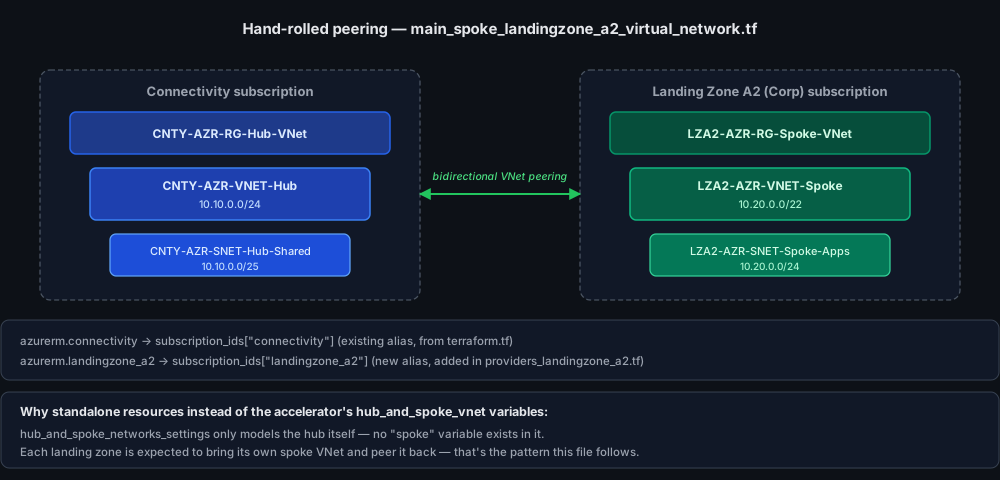
Peering is inherently bidirectional at the API level — Azure doesn’t infer the reverse
direction from one resource, so both blocks are required, one issued from each subscription’s
provider alias. allow_gateway_transit and use_remote_gateways are both false here on
purpose: this spoke isn’t routing through a gateway in either direction yet, just establishing
reachability between the two VNets directly.
Verifying the deployment
Everything above is what the Terraform says it’ll do. Worth actually checking the Azure
portal after apply rather than trusting the plan output alone — a few screenshots from the
real deployment, cross-checked against every claim made above.
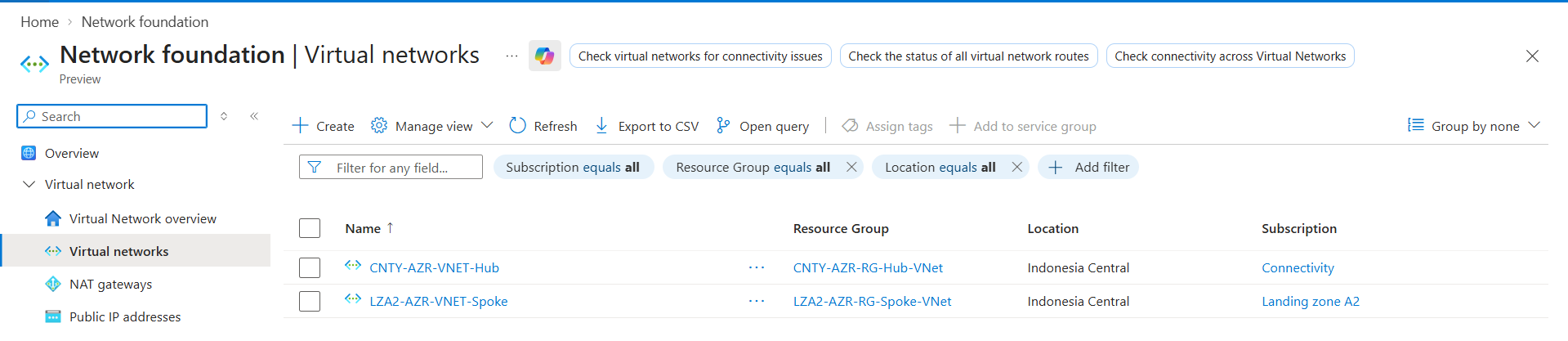
Virtual networks — exactly two, nothing else. No stray Virtual WAN hub sitting around from that unused code path:
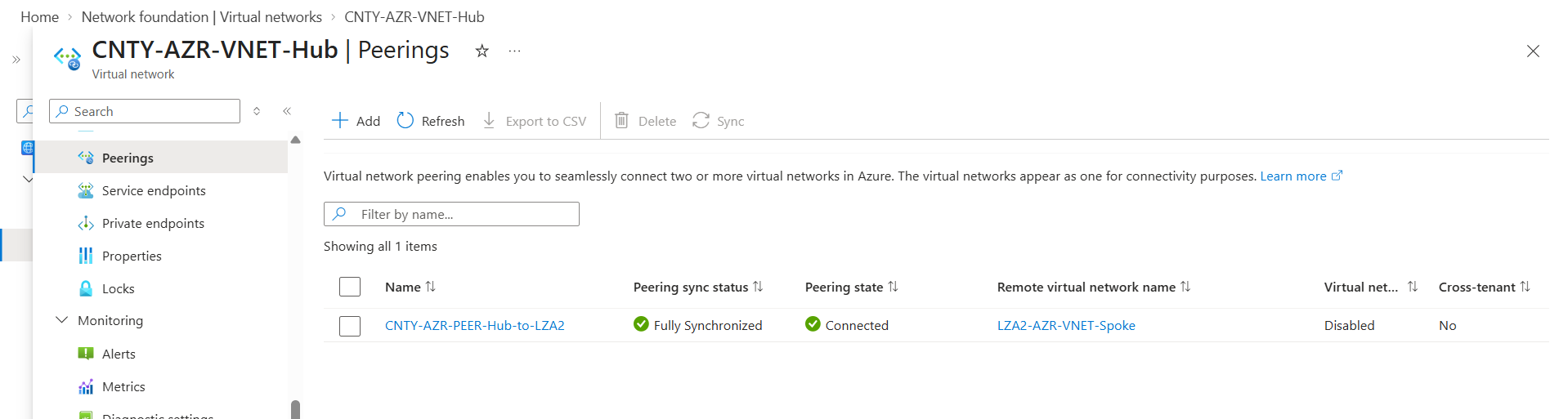
The peering — connected and fully synchronized, matching the resource name from
main_spoke_landingzone_a2_virtual_network.tf exactly:
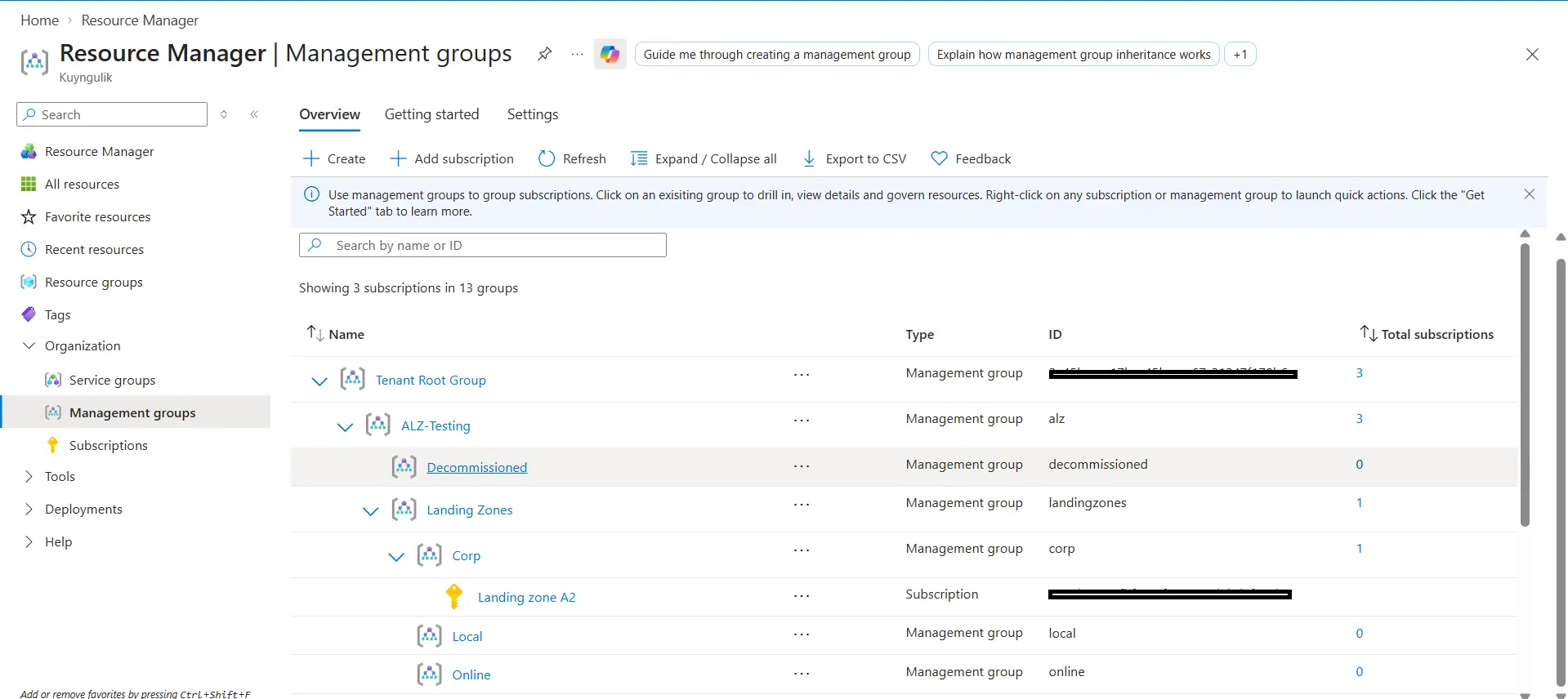
The management group hierarchy — matches the diagram earlier in this post almost exactly:
ALZ-Testing directly under the Tenant Root Group, Platform/Landing Zones/Sandbox/
Decommissioned branching from it, Corp (1 subscription) under Landing Zones:
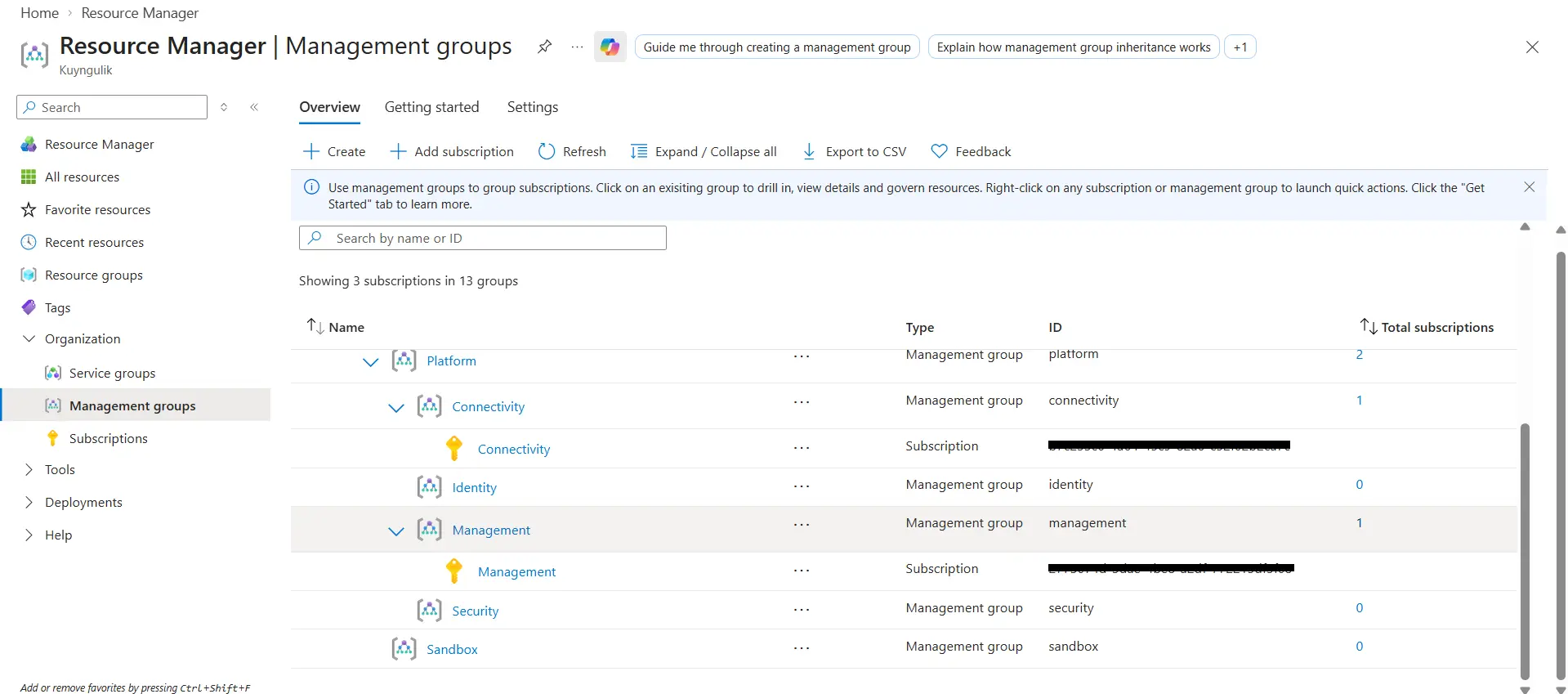
And drilling into Platform confirms Connectivity and Management each hold exactly the one
subscription they’re supposed to, while Identity, Security, and Sandbox sit at zero —
reserved, matching the “hard-coded, unused” note from earlier:
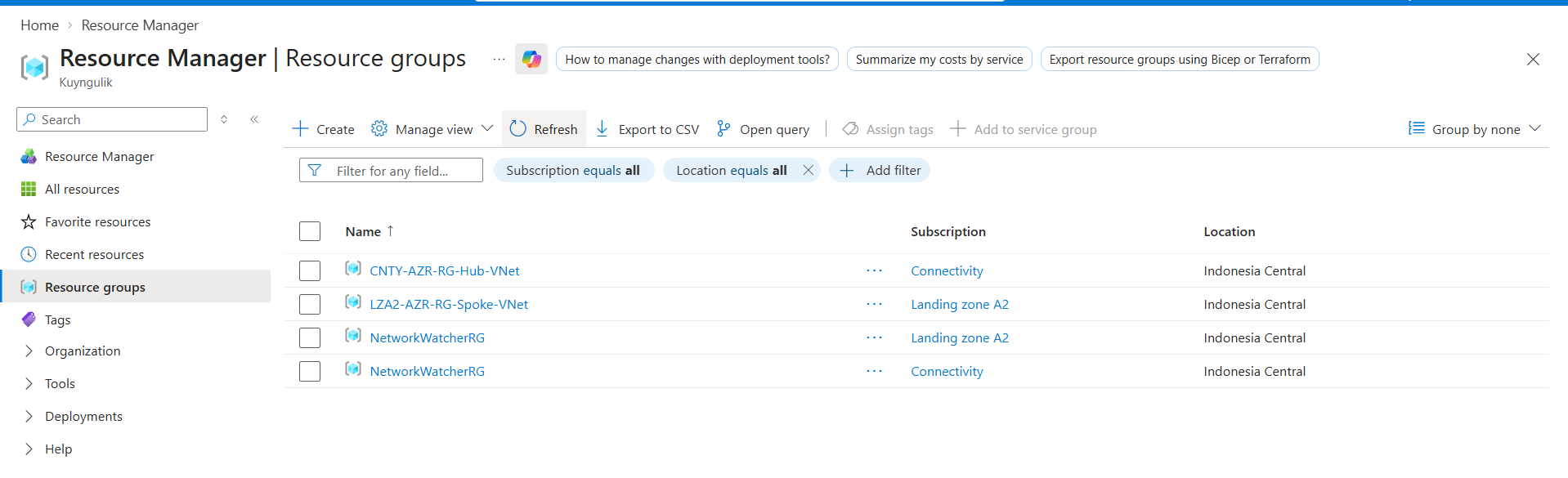
Resource groups — the two this deployment explicitly created, plus something worth knowing
about rather than being confused by later: NetworkWatcherRG shows up automatically in each
subscription with network resources in it. Azure creates that one on its own the first time a
VNet appears in a subscription — it’s not something this Terraform declared, and it’s normal to
see it appear unprompted:
Every claim in this post checks out against what’s actually running — which is really the whole point of writing posts like this alongside the Terraform itself: it’s easy to describe an architecture confidently and be wrong about some detail that only shows up once it’s real.
Accelerator modules vs. hand-rolled resources
The pattern worth taking away from this isn’t really about Azure specifically — it’s a general
shape for extending any opinionated accelerator: use the accelerator’s own variables for
anything it already models (management groups, policy, the hub itself), and reach for plain
resources for whatever sits outside the module’s actual scope — not because the module conflicts
with it, but because it was never meant to cover it. The comment left in
main_spoke_landingzone_a2_virtual_network.tf explaining why it’s hand-rolled instead of
going through the module is doing as much work as the resource blocks themselves — six months
from now, that’s the difference between “obviously intentional” and “why isn’t this using the
module like everything else.”