Closing out the series that started in terraform lab 1 and continued in terraform lab 2: tearing down everything Terraform built, and actually verifying the teardown was clean instead of just trusting the command exited without error.
Destroy
terraform destroy is the inverse of apply — it terminates every resource currently tracked
in state. Scoped strictly to this state file: anything running outside it, managed by a
different project or created by hand, is left alone.
terraform destroy
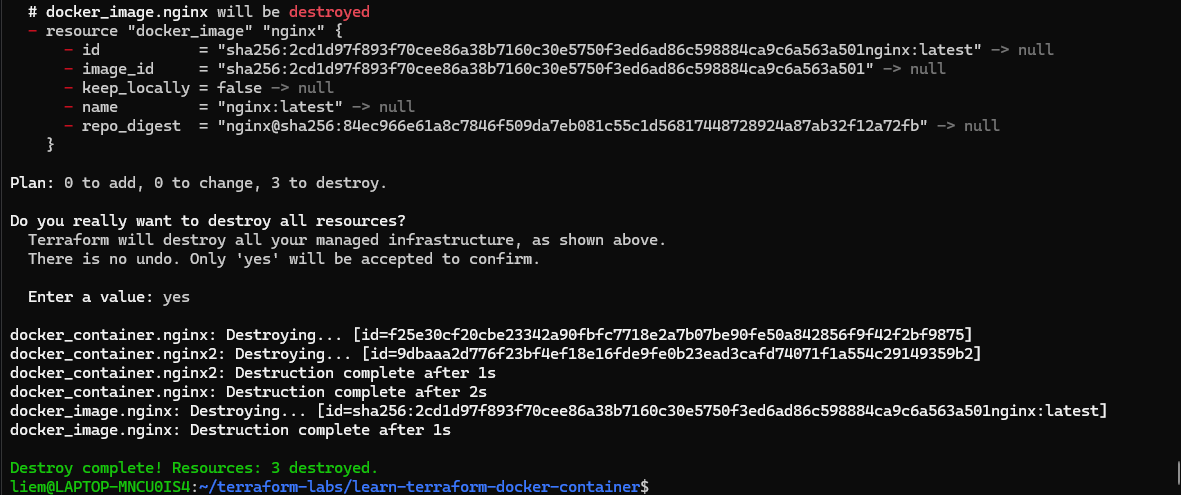
Same confirmation flow as apply — a plan first (3 to destroy: both containers from lab 2
plus the image itself), then yes to confirm. Terraform tears down in dependency order: both
containers first, then the image they depended on, since a container can’t outlive the image
it was built from.
Verify
The exit message says Destroy complete! Resources: 3 destroyed, but I wanted to actually
confirm nothing was left behind rather than take that on faith — checking both Terraform’s own
state and Docker directly, since Terraform can only report on what it tracks:
terraform show
terraform state list
docker ps -a
docker image ls
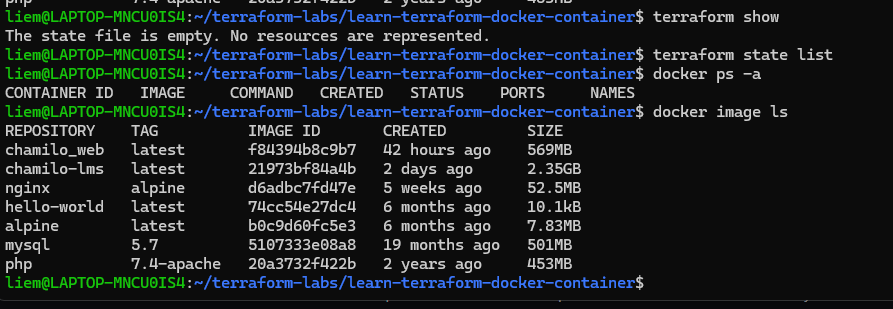
Four confirmations stacked here:
terraform show— “The state file is empty. No resources are represented.” Terraform’s own bookkeeping is clean.terraform state list— no output at all, same conclusion from a different angle.docker ps -a— no containers, including stopped ones (-amatters here — a plaindocker psonly shows running containers, and wouldn’t catch a container that failed to destroy cleanly and got left in a stopped state).docker image ls— thenginx:latestimage is gone too, sincekeep_locally = falsetold Terraform to remove it along with the containers. What’s left —chamilo_web,mysql,php, an unrelatednginx:alpine— are all images from other, unrelated projects on this machine. Exactly the scoping the intro paragraph promised: destroy only touches what the project’s state file actually tracks.
That closes the loop on the basic lifecycle: init → plan → apply → modify → plan →
apply again → destroy → verify. The same shape scales up to configs with dozens of
resources across multiple providers — the commands don’t change, just the size of the plan
output.