Following terraform lab 4, where input variables
made the config flexible on the way in. This lab covers the other direction — output values,
for surfacing specific data back out once apply finishes, instead of grepping through
terraform show every time.
Initial configuration
Same directory, picking up right where lab 4 left off — main.tf referencing both container
name variables, variables.tf holding their defaults:
# main.tf
terraform {
  required_providers {
    docker = {
      source  = "kreuzwerker/docker"
      version = "~> 3.0.1"
    }
  }
}

provider "docker" {}

resource "docker_image" "nginx" {
  name         = "nginx:latest"
  keep_locally = false
}

resource "docker_container" "nginx" {
  image    = docker_image.nginx.image_id
  name     = var.container_name
  hostname = "learn-terraform-docker"
  ports {
    internal = 80
    external = 8080
  }
}

resource "docker_container" "nginx2" {
  image    = docker_image.nginx.image_id
  name     = var.container_name2
  hostname = "learn-terraform-docker2"
  ports {
    internal = 80
    external = 8000
  }
}

# variables.tf
variable "container_name" {
  description = "Value of the name for the Docker container"
  type        = string
  default     = "App-Server"
}

variable "container_name2" {
  description = "Value of the name for the Docker container"
  type        = string
  default     = "App-Server2"
}
Output Docker container configuration
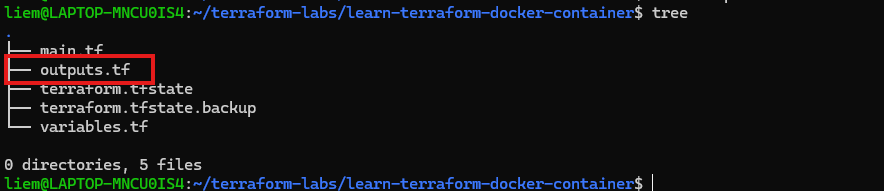
A new file, outputs.tf, declares two outputs — the first container’s ID and the image ID it
was built from:
output "container_id" {
  description = "ID of the Docker container"
  value       = docker_container.nginx.id
}

output "image_id" {
  description = "ID of the Docker image"
  value       = docker_image.nginx.id
}
tree confirms it sitting alongside the rest of the config:
tree
Inspect output values
terraform apply
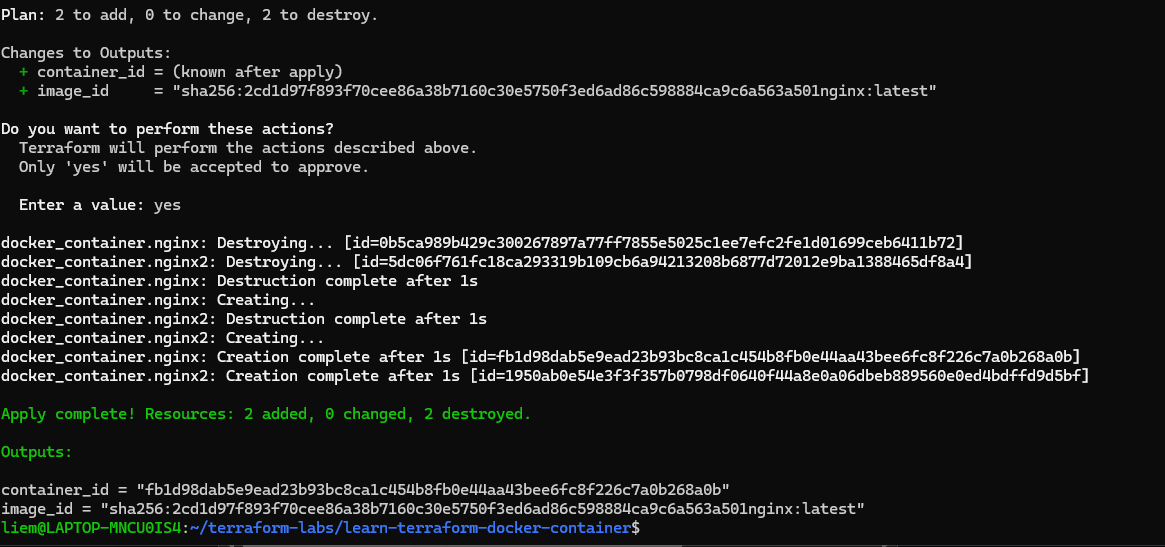
Two things stacked in this one apply. The Changes to Outputs section is new — Terraform
now previews what the output values will resolve to before asking for confirmation, same as
it previews resource changes. And underneath that, the familiar 2 to add, 2 to destroy —
because this config still points name at the variables’ default values (App-Server /
App-Server2), and the last thing that ran in lab 4 was an apply with -var overrides to
Web-Server / Web-Server2. Reverting a create-time attribute is still a replace, whichever
direction it goes — same rule as always, just showing up here as a side effect of moving on to
a new lab rather than the actual point of this one.
Once the apply finishes, Terraform prints the Outputs: block automatically — container_id
and image_id, resolved to their real values, no extra command needed.
terraform output reprints those same two values on demand, without touching state or running
a plan — useful for pulling a value into a script, or just checking it again without scrolling
back through apply history:
terraform output
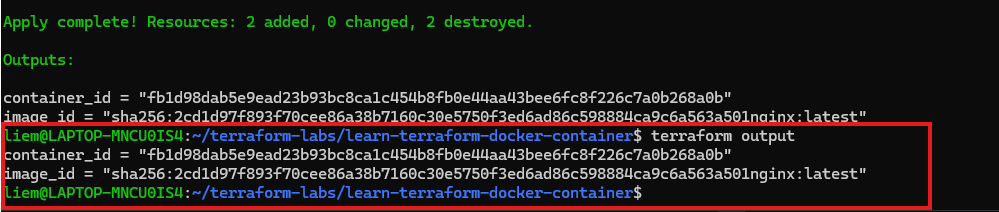
Small addition on its own, but it’s the piece that matters once configs start feeding into each
other — a container_id or image_id declared as an output here is exactly what a different
Terraform config could consume as an input elsewhere, via a data source or remote state. Outputs
are what turns a single config into one composable piece of a larger one.
Next in this series: tips and reference notes collected across these five labs.